
ego
-
Posts
59 -
Joined
-
Last visited
Content Type
Profiles
Forums
Events
Reborn Development Blog
Rejuvenation Development Blog
Desolation Dev Blog
Everything posted by ego
-
Hi there, so here's a little mystery: I wanted to add a new move for my game. I looked at the move Curse first and decided to copy it and modify it later. Copy, paste, change the function code from 10D to 159, define a new move with code 159 -> Check! Everything should work since the only thing I changed so far was the function code. Then I went into the game (debug mode) and taught a Pokemon the new move, went into a battle, used it and got the following error message: I researched a lot and couldn't find anyone else with the same problem. There were some similar ones, but that didn't help me fixing my problem. I also tried to make an "empty" move effect by just putting the class and an end line, but it gave me the same effect. It's really weird that, even though I only copied and paste the whole move effect it gives me this error. Does anyone have an idea what could be going wrong here? Or does anyone have eperience with adding new move effects? Here's what my copied code looks like now
-
Working on Ep 1 of Pokemon Hollow

- Show previous comments 1 more
-

-

good luck, hopefully it gives you a little @ego booster. bad pun is bad
-

Thanks guys
so far it's going well and I hope to present it here soon.
@Wolfox Glace actually you're the first one to make this pun i like that
-
Turns out that in pokemon essentials there too is no animation for the tree if you use it from the party screen. So that one is solved. Kind of
-
Sorry forgot the script. Here's the updated script What do you mean? These are the event commands I'm using for the tree. They are excactly like the ones from Essentials. The first problem I was talking about: You know in the original games, when a Pokemon knows cut it will show the move in the party screen. However if you don't have the requiered badge it will tell you "Sorry a new badge is required.". In my game it shows Ember in the party screen, just as it's supposed to be. But when I don't have the requiered badge, and choose to use Ember from the party screen, it will cut the tree even though I shouldn't be able to do so. I think it skipps the badge check.
-
Hey thanks for your help. I found another problem when trying to test cut in the normal game. Was just a typo. Anyway another 2 problems occured. First, when I talk to the tree while not having any batches it works the way it's supposed to BUT it will let me cut the tree if I use ember from the party screen. And there's the second problem: the animation of the tree being cut down isn't playing and it just disappears. This is still true if I got enough batches. Talking to the tree and cutting it works perfectly fine but not when doing so using the party screen.
-
Hello there, I just started creating my own Pokemon Fan-Game.... or more like a demo.... actually atm I'm just trying out stuff to learn how things work and if it works the way I imagine. So I started to modify the script for the HM Cut, so that it would allow other moves except cut to be used. I followed this tutorial: http://pokemonessentials.wikia.com/wiki/Tutorial:Adding_new_move_effects_outside_battle I changed the script accordingly, so at you could use ember as well (for testing reasons only). In game it allows me to cut trees without a pokemon knowing cut, but with my Litwick knowing Ember. Here's the twist: When I confirm that I want to use cut it says "[Player] used cut.". No Pokemon moving over the screen. Just that message and a cut tree. If I hit "No" it asks me again if I'd like to cut the tree and if I confirm, it tells me "[Pokemon] used Ember" and it also plays the animation the way its supposed to. Anyone an idea what the problem might be? Thanks for your help. Here's my modified script
-
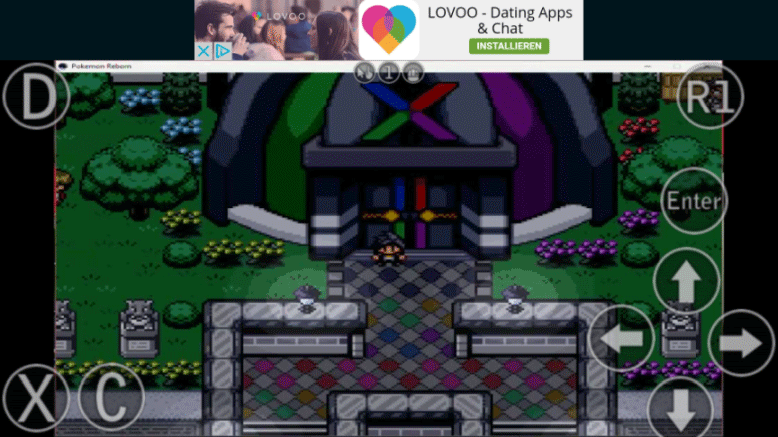
Thanks for your answer I don't know what SimPlay is though So I tried using kainy. Basically it's an app/programm that is made for streaming computer games on your mobile phone. The reason I used this programm, is because of the controls. Streaming your desktop with, for example team viewer, and starting Reborn is possible, but the controls won't work reliable. Plus there are no arrow keys on the keyboard on the phone. Well at least not on mine. I'm gonna give you a list of everything I used and then I'll give my feedback. - Kainy (Programm) (http://www.kainy.com/download.html) - Kainy (App) (available on Google Play as paid and Ad Version; not sure if it's available for IOS) - Windows 10 - Android 6.0.1 - Wifi (200 mbits/s) - Mobile data (50mbit/s) Set up and first test (with Wifi) I first set up kainy on my computer and then on my phone. I connected my phone to my computer and started the stream. Everything worked fine and smooth. The mouse was controlled by touching the screen, clicks and double clicks where made by buttons on the screen. Starting Reborn was no problem at all and worked fine. Using the keyboard I was able to load my savefile, however the keyboard was in the way. So what I had to do was "creating" new buttons (How that works is explained on the kainy homepage). Kainy comes with pretty much every button you could wish. There are buttons for every letter, for alt, ctrl, tab, numbers, controller buttons and even special buttons for certain mouse movements. You can also reasign the function of the buttons. I used the "R1" and reasigned "F12" to it. With this new layout I could play the game. It looked like this now: The whole game ran smooth, with just one minor problem: The sound was of about 2 seconds. But was still fun to play. Second test with mobile: When I tried to connect to my computer, I got the error "Server unreachable". I googled what the problem could be and appearantly it was the firewall. The solution for this problem is also described on the kainy website. However it didn't solve my problem. So as for now I wasn't able to test the stream with mobile data and I couldn't find a solution yet. But I'll be on it and let you know as soon as I find one. Some of you might be worried about the data kainy will use. Like I mentioned before it used around 200mb in about 30 min or less. Next time I'll try it, I'll make sure to keep track of that. That usage is for when you stream in best quality. Maybe setting up kainy to stream with lower quality will "fix" this, but it might as well make it pointless to stream in the first place. That too is a thing I will try though. That's my report so far. If any of you got some more expierience with that or tried for themselves, please let us know.
-
Hey there, so I wanted to play Reborn when I'm at school or somewhere else boring. As we probably all know there's no way to just load the game on your phone and run it. It doesn't work with RPGXP either and I don't think that it will in the near future. So I was wondering how else it could be possible to play mobile. Well, as the title already implies, the soluton is streaming. Or more like a work-around. It works quite well with my phone and computer, however I believe the real problem will be the mobile data. When I just tested it at home with Wifi the app used like 200mb in around 30 min (maybe even less). So this might just be a solution for those of us who can leave their computer turned on the whole time AND got enough highspeed data. I'll try it out tomorrow at school and will report back how it worked. Okay but before I just go ahead and tell how it exactly works I just want to make sure that the devs are okay with it. I don't see a reason why they wouldn't be but better ask first, I guess. What do you say @Amethyst?
-
Hey, not sure if anyone else got this problem, but I wanted to complete the building bridges sidequest, but I can't see the Gurdurr in front of the Celebi cave. And there are no Timburrs either. So basically the whole are looks as usual except the guy from the help request.
-
Ego (Login name as well as in-game name)